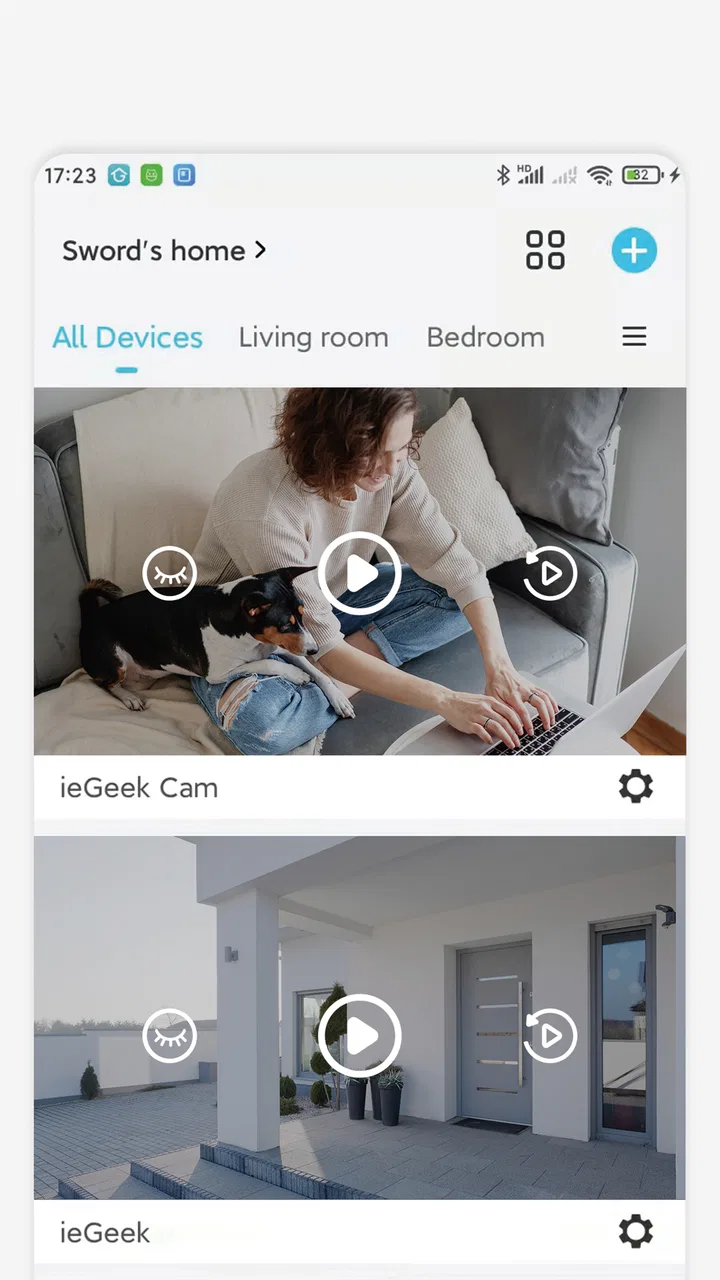
ieGeek Cam
- 4.4
- Rating
- 1.00M
- Installs
- Free
- Price

 Analysis by App-foxy
Choosing a camera app is less about finding the longest feature list and more about matching the app to the camera system already in your home. I approached ieGeek Cam as a practical tools app for people who want to check a compatible ieGeek security camera from a phone, rather than as a replacement for a complete home-security service. That distinction matters: the app can make camera access convenient, but your overall experience still depends on the camera hardware, your network, and how often you need to review alerts or live footage.
My first impression is that the app aims for an uncomplicated setup. Its purpose is clear, and the interface is built around surveillance rather than unrelated smart-home controls. The developer is SHENZHEN GLOBALEBUY CO., LTD., and the app is free to install. It belongs in the tools category, carries a Teen content rating, and works on devices running Android 6.0 or later. For someone who already owns an ieGeek camera, that combination makes it an obvious starting point.
What to consider before choosing a camera companion app
Before installing any surveillance app, I would begin with compatibility. A camera app is useful only when it can communicate properly with the camera model you own. I would check the camera’s packaging, manual, or existing setup instructions first, then install the mobile app. This avoids the common mistake of choosing an app because its name sounds suitable and only later discovering that the hardware belongs to another product family.
You May Also Like

 Blood Strike: 2.5 Anniversary
Blood Strike’s Loadouts Turn Every Drop Into a Tactical Gamble
A close look at Blood Strike’s custom loadouts: how fast access to signature weapons reshapes its battle royale rhythm, rewards preparation, and narrows the gap between fights.

 Pandora - Music & Podcasts
Pandora’s Music Is Easy to Start, but Harder to Recover
Pandora’s strength is its low-effort path from a seed to a station. Its weak spot is how much confidence it asks you to place in connection, setup, and quiet recovery.

 8 Ball Pool
 Is Built on Rivalries, Rematches, and Routine
A close look at the rivalries, rematches, shared routines, and unanswered safety questions that turn a quick pool match into a persistent mobile community.

 Samsung Music
’s Quiet Strength Is Playing What You Already Own
Its reach comes less from spectacle than from dependable access to a personal library. That simplicity is both the app’s strongest retention engine and its ceiling.

 AccuWeather: Weather Radar
AccuWeather Review: A Quick, Clear Forecast for Everyday Decisions
For everyday plans, the best forecast is the one you can understand quickly. AccuWeather makes rain timing, radar, and local conditions easy to act on, with a few trade-offs.

 Hill Climb Racing
Why Hill Climb Racing Still Turns Crashes Into One More Run
A tiny car, a bumpy hill and one more upgrade: Hill Climb Racing keeps resurfacing because its simple chaos makes every near-miss feel personal.
More From Our News Desk



The next question is how you actually use a camera. If you mainly want to look in on a doorway, a pet, a garage, or another room while away, quick access matters more than a crowded dashboard. If you need a multi-camera system, frequent recordings, detailed event history, or integration with other security equipment, you should judge the app as part of a wider system rather than in isolation.
I also pay attention to the phone itself. An older Android device may technically meet the minimum operating-system requirement yet still feel less responsive when handling live video. That is not necessarily a flaw in the app, but it is a practical trade-off. A camera stream uses more battery and data than ordinary browsing, so I would avoid relying on it continuously over mobile data unless the viewing habit is occasional.
Privacy and household routines deserve equal attention. A camera pointed at a shared entrance, a child’s room, or a workplace can affect other people, not just the person holding the phone. I would decide who needs access, keep account details private, and avoid treating a phone notification as a guaranteed emergency response. A surveillance app can help you observe a situation; it should not be confused with a monitored alarm service.
How the app feels in everyday use
The strongest quality here is focus. ieGeek Cam is designed around security-camera access, so the basic mental model is easy to understand: open the app, find the relevant camera, and check what is happening. I prefer that kind of focused design to a general smart-home application that buries camera controls among lights, plugs, routines, and unrelated device categories.
A realistic example is checking the front entrance after hearing a delivery notification. I would open the app, select the camera, look at the live view, and close it again rather than leaving the stream running. That short workflow is where a camera companion app earns its place. It saves the need to walk to another room or open a computer, while keeping the phone as the central viewing device.
Another useful routine is checking a room before leaving home. I would use the live view as a quick confirmation that a door is closed, a pet is where expected, or an area looks normal. The value is not dramatic; it is the reduction of small uncertainties during the day. For this kind of use, a straightforward app is more valuable than an elaborate interface that takes several steps to reach the camera.
The app’s popularity also gives it a degree of practical reassurance. It has an average rating of 4.4 from around 20 thousand ratings, with roughly 1 thousand written reviews, and it has passed 1 million installs. Those figures do not guarantee that every camera owner will have a smooth experience, but they suggest that the app is established enough to have been used by a substantial audience rather than being an obscure companion utility.
Small workflow choices that make a difference
One habit I recommend is deciding in advance what “normal” looks like for each camera. If you use the app only when something seems wrong, you may waste time trying to interpret an unfamiliar view. A brief check during ordinary conditions helps you recognize changes later, such as an open gate, an object blocking the lens, or a camera that has lost its expected position.
I would also keep the camera list organized around locations instead of vague labels. Names such as “front door” or “back room” are easier to act on than factory-style names, especially when checking the app quickly. This is a simple improvement, but it reduces hesitation when more than one camera is connected.
For a household, agree on a basic access routine before everyone starts using the app. Decide which person handles setup, who should receive access, and who is responsible for checking a camera when an alert appears. Sharing passwords casually can create more confusion than convenience. A clear household process is especially helpful when one person is away and another needs to check the live view.
Finally, I would treat the app as a viewing and management tool, not as the only layer of protection. Keep physical locks, lighting, and sensible routines in place. A camera can show what happened or what is happening, but it cannot prevent every incident by itself.
Where ieGeek Cam has a clear advantage
The biggest advantage is the direct relationship between the app and ieGeek camera equipment. If you already own compatible hardware from the same ecosystem, choosing the manufacturer’s companion app is usually less frustrating than experimenting with unrelated camera platforms. You have one place to begin, one product family to learn, and fewer reasons to wonder whether a problem comes from the app or from an unsupported device.
It is also a sensible choice for users who want a dedicated security-camera experience without paying an upfront app price. The app is free, which lowers the barrier to trying it with a compatible camera. That does not mean every connected function is necessarily free: the listing shows in-app purchases ranging from $1.99 to $359.99 per item. I would therefore review any purchase screen carefully and distinguish the cost of the app from the cost of optional services or equipment-related features.
The current version is 6.2.1, and the app was released on February 24, 2022. Those details matter less than day-to-day reliability, but they show that this is not a newly appearing utility with no history. I would still keep the app updated through the normal app-store process, especially for a security-related tool, because camera applications need to remain compatible with changing phone software and network environments.
Another strength is the low learning curve for a single-camera owner. Someone who only wants to check one important area is unlikely to benefit from a professional surveillance console with complex layouts and technical controls. The simpler route is often better: open the companion app, view the camera, and return to normal phone use.
Limitations that should shape your decision
The app is not automatically the right answer for every surveillance setup. If your cameras come from several manufacturers, a single-brand companion app may leave you switching between applications. In that situation, a multi-brand camera platform may be more convenient, even if it feels less tailored to any one device.
There is also a difference between convenience and professional monitoring. I would not choose this app alone for a business that needs a dedicated control room, formal incident procedures, or a large collection of cameras viewed by several operators. A phone-based companion app is better suited to personal or small-scale observation than to an organization with specialist surveillance requirements.
Network conditions can create another source of frustration. Live video depends on the camera’s connection, the phone’s connection, and the route between them. If the picture loads slowly or fails to appear, repeatedly tapping the screen may not help. I would first check whether the phone has a stable connection, then consider whether the camera itself is online before assuming the app is broken.
Notifications also need realistic expectations. An alert can prompt you to open the app, but it is not the same as having a person continuously watching the camera. If a notification arrives late, is missed, or is triggered by an event that is not urgent, you still need your own judgment. For sensitive situations, I would combine camera checks with other practical safeguards rather than depending on one phone alert.
The Teen content rating is worth noting for families. It does not make the app unsuitable for every household, but parents may want to decide which family members should use it and what camera views they can access. Security footage can be personal, and access should be treated accordingly.
How it compares with the usual alternatives
The most natural alternative is the camera manufacturer’s other companion app, if your hardware supports one. A dedicated brand app usually has the best chance of matching the camera’s controls and setup flow. In contrast, a general smart-home app may be preferable when you want cameras displayed alongside lights, sensors, locks, or routines from different brands. The trade-off is that broader compatibility can come with a less focused experience.
A browser dashboard or desktop surveillance program may suit someone who watches several feeds for long periods. I would choose that route for a shop, office, or large property where a bigger screen and persistent layout matter. For checking a single home camera while out, a phone app is more practical and less demanding.
Professional security software is a different category altogether. It may be better when you need advanced recording management, multiple user roles, or formal monitoring procedures. The downside is greater complexity, more setup work, and potentially higher overall cost. I would not move to that type of system unless my needs had clearly outgrown a straightforward camera companion app.
In other words, ieGeek Cam wins when the priority is a compatible ieGeek camera and convenient personal access. It becomes less attractive when the priority is cross-brand control, professional surveillance, or a large multi-user operation. Knowing that boundary is more useful than simply calling the app good or bad.
What switching will cost you in time and habit
Moving from another camera app is not just a matter of downloading a new icon. You may need to reconnect cameras, rename locations, re-establish household access, and learn a different notification routine. Before switching, I would write down the camera locations and the people who need access, then test the new setup while the old system is still available.
The financial side also deserves care. The app itself is free, but optional in-app items can range from $1.99 to $359.99 each. I would avoid assuming that installing the app settles the total cost of ownership. Check what each purchase is for, whether it is relevant to your camera, and whether the feature is something you will genuinely use. A low-friction installation can otherwise lead to an unexpectedly expensive decision later.
There is a practical benefit to staying within one ecosystem once everything works. Camera names, household habits, and troubleshooting steps become familiar. The cost is reduced flexibility: if you later replace the camera with a different brand, the app may no longer be central to your setup. That is the main reason I would think about long-term hardware plans before building a whole home around any single companion app.
Who should install it and who should look elsewhere
I would recommend ieGeek Cam to someone who owns a compatible ieGeek security camera and wants a focused mobile way to view and manage it. It is especially suitable for ordinary home scenarios: checking an entrance, keeping an eye on a pet, confirming what is happening in a room, or making a quick remote observation without setting up a computer.
I would be more cautious if you are still choosing hardware and have not committed to the ieGeek ecosystem. In that case, compare the complete camera system, not just the app. Consider how many cameras you may add, who will use them, how you handle recordings, and whether you want one brand or a mixed setup. The free download should not be the only reason to choose the hardware.
I would also suggest looking elsewhere if you need a professional surveillance console, extensive cross-brand control, or a formal monitoring service. Those requirements call for a different class of solution. Likewise, people who dislike managing accounts, notifications, and network troubleshooting may prefer a simpler camera arrangement or a system with more hands-off support.
My recommendation after weighing the trade-offs
My final view is straightforward: ieGeek Cam is a sensible companion app when your camera choice and your phone-based viewing needs already point toward ieGeek. Its focused purpose, free installation, established user base, and accessible approach make it easy to recommend for personal monitoring. I would not present it as a universal security platform, because the best option changes once you need mixed brands, professional oversight, or a more elaborate surveillance workflow.
Before committing, I would confirm camera compatibility, decide who needs access, review any optional purchase carefully, and test the app under the network conditions where you will actually use it. Those steps prevent most avoidable disappointments. Used with realistic expectations, the app can turn a compatible camera into a convenient everyday check-in tool rather than another complicated device to manage.
For my own decision, the key question would be simple: do I want a focused companion for an ieGeek camera, or do I need a broader security platform? If the first answer is yes, I would give this app a try. If the second is true, I would compare multi-brand and professional alternatives before building my setup around it.
FAQs for ieGeek Cam
01What is ieGeek Cam, and what can I use it for?
ieGeek Cam is the companion application for compatible ieGeek security cameras and video doorbells. After pairing a supported device, you can view live video, check motion alerts, communicate through two-way audio, and review recordings when storage is available. The exact tools depend on your camera model, firmware, and subscription or storage setup, so it is worth checking compatibility before downloading.
02How do I connect an ieGeek camera to the app?
To set up an ieGeek camera, install ieGeek Cam, create or sign in to an account, and follow the in-app pairing instructions. Most models require a stable Wi-Fi connection and may display a QR code for the camera to scan during setup. Many devices work only with 2.4 GHz Wi-Fi, so a dual-band router may need to be configured accordingly. Keep the camera near the router while completing installation.
03Does ieGeek Cam require a subscription or paid storage?
The app can generally be downloaded and used to manage a compatible camera without an immediate subscription, but available recording options vary by model. Some cameras support local storage, such as a microSD card, while others offer cloud recording through an optional paid plan. Features such as longer video history, extended cloud retention, or advanced detection may require payment, so review the plan details shown for your device.
04Can I watch live video and receive alerts when I am away from home?
Yes, ieGeek Cam is designed to provide remote access to compatible cameras, allowing you to view live footage and receive notifications when motion is detected. Reliable performance depends on both the camera’s internet connection and your phone’s mobile or Wi-Fi connection. Notification timing can also be affected by battery-saving settings, weak signals, detection sensitivity, or disabled permissions on your Android or iOS device.
05Is ieGeek Cam safe to use, and what permissions does it need?
ieGeek Cam needs permissions that support camera setup and remote monitoring, such as access to the local network, notifications, microphone, and sometimes photos or Bluetooth depending on the device and installation method. Use a strong, unique account password, update the app and camera firmware, and enable available security options. Before granting access, check the current privacy policy and limit permissions that are not necessary for your chosen features.
Pros
- Supports remote live viewing from anywhere with an internet connection.
- Motion alerts help you react quickly to activity around your property.
- Night vision provides usable monitoring in low-light conditions.
- Two-way audio allows communication through the camera.
- Cloud and local storage options may suit different recording needs.
Cons
- Some advanced features may require a paid subscription.
- Video quality depends heavily on your Wi-Fi connection.
- Frequent alerts can become distracting in busy areas.
- Initial setup may take time for less experienced users.
- Privacy concerns may arise when using cloud-connected cameras.

ieGeek Cam
Gallery